The same month-end
Two ways to close the books.
Drag to compare. Same sales register, same GST, same reconciliation — three hours of keying, or one sentence.
You ask once.
- ✓1,000 sales vouchers posted from Excel with automatic GST split
- ✓Reconciled against the bank statement — every break flagged automatically
- ✓Day book & trial balance exported directly to Excel
← Drag the handle to compare manual entry versus TallyMCP →
Target Audiences & Workflows
Built for accounting precision and developer safety.
Whether you audit books for 40 clients or build enterprise automation on private accounting servers, TallyMCP fits your security model.
Chartered Accountants & Practitioners
Audit client companies in minutes instead of days. Query Trial Balances, filter Day Book transactions, and check debtor aging without navigating 15 menus.
- •Natural language Day Book spot audits for high-value vouchers
- •Instant Sundry Debtors aging analysis (> 90 days)
- •Bank statement Excel reconciliation with ledger suggestions
SME Finance & Accounting Teams
Eliminate repetitive data entry. Drop invoices, transport bills, and bank statements directly into Claude or Cursor to auto-stage balanced voucher drafts.
- •Bulk purchase invoice ingestion into staged drafts
- •Review debit/credit balances in interactive /approve modal
- •Auto-under-limit mode for recurring micro-payments (e.g. < ₹5,000)
AI Developers & Internal Tools Engineers
Build custom accounting agents, ERP sync pipelines, and automated reporting bots using standard Model Context Protocol (MCP) primitives.
- •12 deterministic JSON tools callable via stdio or HTTP
- •Connect Cursor, Windsurf, or custom Python / LangChain agents
- •Cryptographic HMAC hashing on voucher drafts with rollback safety
On-Premises & High-Privacy Enterprises
Strict compliance environments where financial data cannot route through third-party cloud brokers. TallyMCP works 100% offline with local open-weights LLMs.
- •Zero telemetry, zero external network sockets, loopback only
- •Local model execution via Ollama (Llama 3, DeepSeek) or LM Studio
- •Permanent audit trail preserved in %LOCALAPPDATA%\TallyMCP\
Two-Phase Commit · Safety by Design
How AI drafts vouchers. You keep full control.
AI models never write directly to Tally. Dedicated /approve links open an interactive “See Details” modal with complete ledger breakdowns, balance verification, and 1-click confirmation.
How AI Interacts with Tally: Two-Phase Human Approval
AI queries masters and drafts balanced double-entry vouchers. Nothing touches TallyPrime until you click the dedicated /approve link to review and confirm in the interactive inspection modal.
I verified your active company Acme Trading Pvt Ltd, validated debit/credit balance, and staged the payment draft locally:
Voucher Review: Payment Draft
d_e3b0c442Target Company: Acme Trading Pvt Ltd · Date: 2026-10-18
| Account / Ledger | Category | Debit (Dr) | Credit (Cr) |
|---|---|---|---|
| Apex Logistics | Sundry Creditor | ₹50,000.00 | — |
| Bank Account - HDFC | Bank Accounts | — | ₹50,000.00 |
| Verified Balanced: Debits == Credits (Diff: ₹0.00) | ₹50,000.00 | ₹50,000.00 | |
Freight payment for Bill #OCT-9021. Staged via Claude Desktop tallymcp.pro.
8f4e2b07d4c844a2b97c1e7a0921...
Tamper-proof signature verified against local secretAI can never post invoices or payments without explicit human authorization. Every draft generates an HMAC link and waits on your click.
The inspection modal gives you an instantaneous ledger balance check. Total amounts are dynamically calculated with zero formatting errors.
Fully verified against TallyPrime Release 7.2, 6.x, and 5.x with 43 automated unit & integration tests passing in CI.
Drop in a PDF or scan. Get an audited voucher.
Bank statements from any Indian bank, vendor tax invoices, scanned receipts, or Bills of Entry — parsed deterministically, reconciled with masters, and staged for review.
Drop Document
Bank statements (PDF/CSV), supplier invoices, scanned bills, or BOEs.
Extract Schema
Parsed into structured fields: line items, GSTIN, HSN, CGST/SGST/IGST tax breakdowns, and dates.
Reconcile Masters
Matches party ledgers, tax rate ledgers, and items against your open company in TallyPrime.
Stage & Review
Balanced double-entry draft staged locally. You confirm via browser modal before anything writes.
Download TallyMCP
Ultra-lightweight native Rust binary. Zero runtime dependencies, zero telemetry.
One-click installer extension for Claude Desktop
Direct bundle (.mcpb) for effortless installation inside Claude Desktop without editing manual JSON files.
Desktop version of Claude AI supports loading of local MCP server. Ensure you have Pro / Team / Max / Enterprise subscription of Claude, which supports higher limit compared to Free. MCP makes multiple calls to Tally for validation and inference, which might exhaust free limits quickly. Download Claude Desktop from following link: claude.ai/download
- Go to menu > File > Settings
- Extensions > Advance Settings
- Click on install extension button
- Browse the extension file (with file extension mcpb, e.g.
tally-mcp-1.0.1.mcpb) downloaded from our releases - A dialog window will appear asking “Do you want to install Tally Prime?” Click Install button, which would install the Tally MCP Server
Open any new conversation in Claude Desktop. Click on the + attachment icon > Connectors (or navigate to Settings > Connectors) to verify that tallymcp.pro (Tally Prime) is displayed with an active green status toggle and all accounting tools enabled.
Security Invariants & Guarantees
- Read-Only Safe Defaults: Ledger balances, trial balance, and day book queries are non-mutating.
- Human-in-the-Loop Writes: AI models cannot commit changes directly; drafts produce dedicated loopback
/approvelinks. - Dynamic Safety Controls: Switch safety policy between
Approve,Auto under limit, orOffdirectly in the UI. - Zero Telemetry: Native Rust binary with zero analytics, phone-home, or background tracking.
- TallyPrime 7.2 Verified: Official compatibility with TallyPrime Release 7.2 (Latest), 6.x, and 5.x.
Release v1.0.1 Highlights
Dedicated /approve Route & 'See Details' Modal
Voucher writes staged locally with SHA-256 HMAC integrity. Interactive out-of-band modal verifies balanced Debits & Credits before posting.
Dynamic Runtime Safety Modes
Switch seamlessly between 'approve' (human confirmation), 'auto_under_limit' (auto-post below ₹ threshold), or 'off' (read-only queries).
Deterministic Empty-Report Guards
Catches empty XML envelopes and returns structured guidance to your AI agent instead of blank payloads or hallucinated responses.
TallyPrime Release 7.2 Compatibility
Full out-of-the-box support for TallyPrime Release 7.2 (Latest Release), 6.x, 5.x, 4.x, and 3.x+ over standard port 9000.
System Architecture & Data-Flow Matrix
Transparent data pathways under standardized identifier tallymcp.pro. No hidden proxies, no external relays.
Deterministic Data Isolation & Architecture
AI clients connect via local stdio. Mutations strictly require local browser sign-off at 127.0.0.1:9190/approve.
Claude · Cursor · Windsurf
Dispatches Model Context Protocol calls via standard input/output.
tally-mcp (v1.0.1)
Parses requests, enforces HMAC token signing, converts TDL/XML to deterministic JSON.
Interactive Review Modal
Dr/Cr balance check, ledger allocation inspect & 1-click cryptographic confirmation.
Release 7.2 (Latest)
Native HTTP/XML connector. Full support for Release 7.2, 6.x, 5.x, 4.x.
| Workflow | Network Transmission | Retention & Privacy Guarantee |
|---|---|---|
| Core Tally Queries (Ledgers, Day Book) | Process stdio → Host AI Client (Claude, Antigravity, Cursor) | Query results are processed by your chosen AI model provider in your chat context. TallyMCP stores nothing externally. |
| Voucher Draft Writes | Local files → Dedicated loopback UI (http://127.0.0.1:9190/approve) | Kept strictly on local disk with SHA-256 HMAC hash (%LOCALAPPDATA%\TallyMCP\drafts\). AI models cannot post writes to Tally directly; human confirmation via the interactive modal transitions status from PendingApproval to Approved before committing. |
| 100% Offline Profile | 127.0.0.1 loopback only (Local Ollama / LM Studio) | Tally data is transmitted solely to your configured AI client (Claude Desktop, ChatGPT, or local Ollama) as conversation context. Zero intermediary relay servers, zero telemetry or data harvesting. |
| TallyMCP Desktop App | None (Loopback only) | Zero telemetry, zero analytics, zero automated crash reporting. |
Why CAs and developers choose local TallyMCP.
Comparing TallyMCP against Docs by Ira (Tally), hosted cloud sync tools, and DIY XML prompting. All third-party statements are dated and cross-referenced with vendor documentation.
| Feature & Metric | TallyMCP (this server)Recommended | Docs by Ira (Tally)TallyIra | Hosted cloud sync tools | DIY XML prompting |
|---|---|---|---|---|
Workflow Integration | Works inside Claude & CursorLocal MCP Server Works inside Claude Desktop, Claude Code, Cursor and other MCP clients. ChatGPT needs a remote-reachable server. | Inside TallyPrime & Mobile AppTallyPrime 7.0+ Works inside TallyPrime and the TallyIra app; focused on turning invoices into vouchers. No documented third-party AI assistant or MCP integration. Vendor docs | Separate Dashboards & Logins Requires logging into external vendor portals, managing another set of logins, and maintaining cloud sync bridges. | Copy-Paste Between Windows Manual copy-pasting of XML payloads and prompts between a browser chat window and Tally terminal. |
Cost Economics | Free & Open SourceMIT / Apache-2.0 TallyMCP is free and open source (MIT / Apache-2.0). Your chosen AI provider bills its own subscription or API usage separately. | Metered Packs + Active TSS₹200 / 100 pages ₹200 + GST per 100-page pack after the introductory free allowance. Requires an active Tally Software Services (TSS) subscription. Vendor docs | Paid Subscriptions Recurring vendor subscriptions; pricing and contract terms vary by provider and company count. | No Licence Fee (Time Cost) No software purchase cost, but incurs substantial developer time, trial-and-error, and troubleshooting. |
Scope Coverage | 35 Structured Tools35 Tools 35 tools: ledgers, Day Book, trial balance, ageing, GSTR-2B triage, draft vouchers, and statutory audit checks (Secs. 269SS/269T/40A(3)/PF-ESI flags). | 8 Invoice Voucher Types8 Voucher Types Creates 8 voucher types from invoices (Purchase, Sales, Orders, Notes); English invoices only; no bank statements; no documented ledger Q&A. Vendor docs | Fixed Sync & Dashboards Typically fixed reporting dashboards and periodic sync features; capabilities vary by vendor. | Whatever You Can Prompt Whatever you can prompt and import yourself; smaller LLMs often struggle with complex nested XML tags. |
Data path Privacy | Local Loopback to TallyDirect Loopback Connects to Tally on your machine. TallyMCP has no relay and (by design) no telemetry. Prompts and results go to your chosen AI provider. | Tally Online ProcessingOnline Service Documents processed by Tally's online service; Tally states they are used only for processing and not to train others' models. Vendor docs | Vendor Cloud Storage Data is usually synchronized to and stored on the vendor's cloud infrastructure. | Web Chat Provider Accounting data and financial figures go to whichever public AI chat provider or API endpoint you paste into. |
Write safety Integrity | Default Approve ModeTwo-Phase Review In default Approve mode, nothing posts to Tally until you review and approve a draft that balances. Configurable auto mode available under strict limits. | In-Tally Review Before PostingIn-App Review Drafts generated from OCR are reviewed and confirmed directly inside TallyPrime before posting to the books. Vendor docs | Varies by Vendor Some tools offer review queues while others perform direct automated sync; review vendor documentation. | Manual Import & Checks Manual XML file export and import into Tally, requiring you to perform your own balance and syntax verification. |
Local models On-Premises | LM Studio & MCP FrontendsOffline Ready Works with local tool-calling models through an MCP-capable client such as LM Studio (0.3.17+) or Claude Desktop with local endpoints. | Requires Internet & TSS Requires active internet connectivity for cloud OCR parsing and active TSS license verification. Vendor docs | Requires Vendor Cloud Cannot operate without active connectivity to the vendor's cloud servers. | Difficult Without Tools Local models struggle without structured tool definitions; high risk of malformed XML or invalid request structure. |
Disclaimer: Tally and TallyPrime are registered trademarks of Tally Solutions Pvt. Ltd. Claude is a trademark of Anthropic PBC. Cursor is a product of Anysphere Inc. TallyMCP is an independent, community-driven open-source project and is not affiliated with, endorsed by, or sponsored by Tally Solutions or Anthropic. Statutory tax audit engines (Secs. 269SS/271D, 269T/271E, 40A(3), 36(1)(va)) generate automated analytical exception flags intended for professional CA review and do not constitute legal determinations.
Why use fragmented tools when Claude or Cursor can be your unified assistant?
You already use Claude, Cursor, or your local LLM to draft emails, analyze contracts, and write code. TallyMCP connects that same assistant directly to your TallyPrime books locally — giving you instant answers, BRS reconciliation, and voucher drafts with zero per-page fees.
Interactive Setup & Live Verification
Tally MCP Server Claude & Client Configuration | Live PoC
Experience the native tally mcp server claude integration. Generate properly escaped configuration for Claude Desktop, Cursor, Antigravity, or Windsurf on Windows, or install via one-click .mcpb bundle.
Instant Self-Served Setup via CLI Wizard
The installer adds tally-mcp to your PATH. Open PowerShell and run this single command to automatically configure Claude Desktop, Cursor, and Windsurf without editing JSON manually:
tally-mcp setuptally-mcp doctor💡 tally-mcp doctor validates port 9000 reachability, active company, and client configuration health (with diagnostic discovery for tallymcp.pro, tallymcppro, and legacy tally).
Manual Client Configuration
Select your AI client. Claude Desktop (Local stdio) is the officially recommended, 100% private configuration.
$env:USERNAME{
"mcpServers": {
"tallymcp.pro": {
"command": "C:\\\\Users\\\\<YOUR_WINDOWS_USERNAME>\\\\AppData\\\\Local\\\\Programs\\\\TallyMCP\\\\tally-mcp.exe",
"args": [
"serve"
]
}
}
}"tallymcp.pro" (also backward-compatible with legacy "tally" in tally-mcp doctor).%APPDATA%\Claude\claude_desktop_config.json).taskkill /IM Claude.exe /FClaude Desktop Live Connector Proof
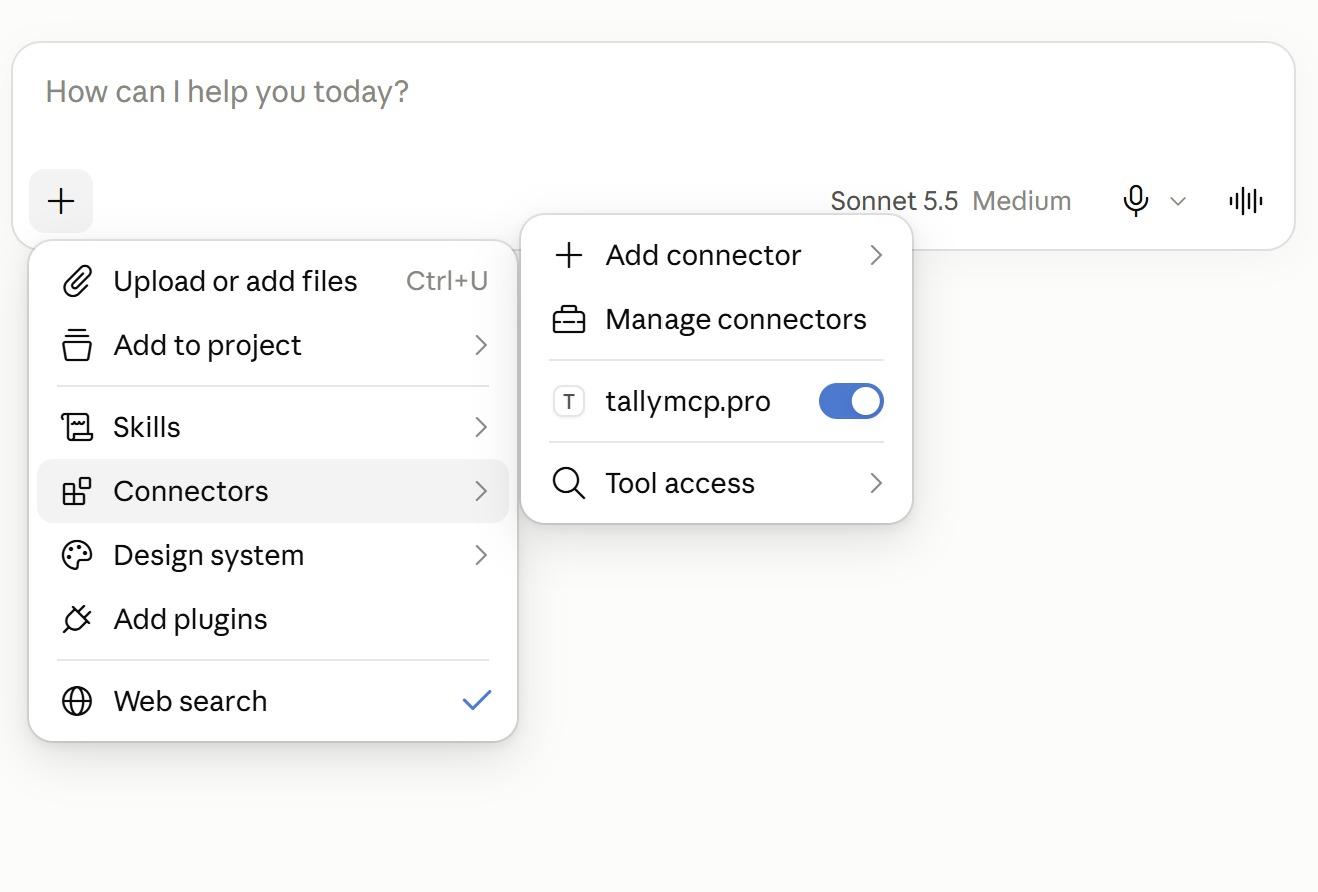
Open any chat in Claude Desktop, click + ▸ Connectors to confirm tallymcp.pro is active.
Verified Proof of Concept (PoC) · Claude Desktop Live Demonstration
Live ProofReal unedited screenshot showing tallymcp.pro active in Claude Desktop's native Connectors menu with verified tool access.
Live confirmation of successful MCP integration
When you configure claude_desktop_config.json, Claude Desktop handles subprocess spawning over stdio automatically. Here is how to verify:
Discovered automatically via claude_desktop_config.json stdio definition. Claude mounts it directly into the native + attachment popover.
The green toggle icon confirms the native Rust binary (tally-mcp) is running and successfully communicating with Tally on port 9000.
Clicking 'Tool access >' unlocks tally_status, tally_day_book, tally_trial_balance, and draft voucher staging for conversational queries.
taskkill /IM Claude.exe /FFrequently Asked Questions
Straight answers on data safety, permissions, and operations.
What is TallyMCP's license and is it free to use for my business?▼
Yes, completely. TallyMCP is open-source software, dual-licensed under both the MIT License and the Apache License (Version 2.0) at your option.
Anyone can inspect the code, compile it from source, use it for personal or commercial accounting, run it across your internal CA firm or business network, and integrate it with your AI agents without any monthly subscription fees or telemetry.
Can an AI model alter or delete my accounting records?▼
%LOCALAPPDATA%\TallyMCP\drafts\ and require manual out-of-band human confirmation in your browser before anything is submitted to Tally.Do I need administrator privileges?▼
%LOCALAPPDATA%\Programs\TallyMCP\, requiring no UAC elevation or administrator rights.Which versions of TallyPrime are supported?▼
How does the dedicated /approve route and “See Details” modal work?▼
http://127.0.0.1:9190/approve?draft_id=...&hash=.... Opening this route automatically pops up the interactive Review Modal with an exact double-entry ledger breakdown table, balance verification badge, and 1-click Confirm & Post to Tally.Can I customize the safety mode?▼
POST /api/safety/config. You can switch between approve (human confirmation for all writes), auto_under_limit (auto-commit below a configured ₹ limit), or off (read-only queries only). Settings persist directly to config.toml.Does my accounting data leave my PC?▼
127.0.0.1:9000) with zero intermediary cloud relays, telemetry, or data harvesting. When you chat with your chosen AI assistant (such as Claude Desktop, ChatGPT, or Gemini), only the specific prompts and necessary accounting context leave your computer to reach your AI provider over your direct API or desktop app session.How do I set up the tally mcp server claude integration using the one-click .mcpb file?▼
Claude Desktop supports direct extension installation via .mcpb bundles. Download our official release bundle tally-mcp-1.0.1.mcpb.
In Claude Desktop, go to File > Settings > Extensions > Advance Settings, click Install extension, browse the .mcpb file, and click Install when prompted. Verify by checking that tallymcp.pro is active in Claude Desktop's Connectors menu.